Close a position without buying the flour
A futures position can usually be closed by an opposite trade in the same contract. Closing removes that position; it does not cancel the bakery’s need for flour. Continue with the fictional 25-bag September flour future.
Predict first, run the calculation, then make the requested change. Each exercise has a check; enter numbers without units.
How do you close a futures position?
A futures position can usually be closed by an equal opposite trade in the same contract. Sell the same contract to close a long position; buy it back to close a short position. Specifications and delivery month must match.
| Starting position | Closing trade | Remaining position |
|---|---|---|
| Long 3 September contracts | Sell 3 matching September contracts | Zero |
| Short 3 September contracts | Buy 3 matching September contracts | Zero |
| Long 3 September contracts | Sell 3 December contracts | Long September and short December; not closed |
Cumulative futures profit and loss
For a position held at constant size, long P&L = quantity × (exit price − entry price). For a short, reverse the subtraction. Closing removes the position, not the gain or loss. Daily settlement pays those changes along the way; it is not an additional profit at closing. Offsetting futures does not buy the bakery’s physical flour.
Exercise 1 — Give the position a sign
Use positive counts for long contracts and negative counts for short contracts. A long position benefits from rising futures prices; a short position benefits from falling prices. Express three long contracts as a signed count, then try a short position.
Exercise 2 — Record an opening trade
The bakery starts with no futures position and buys three contracts. Add the signed trade to the starting position. Before trading again, ask whether the next action should add exposure or remove it. The balance is a contract count, not a cash balance.
Exercise 3 — Offset the same contract
To close three long September contracts, sell three September contracts with the same specifications. Add the signed counts. The result is zero remaining exposure in that contract. The original trade was not erased: its gain or loss still belongs to the account.
Read the picture
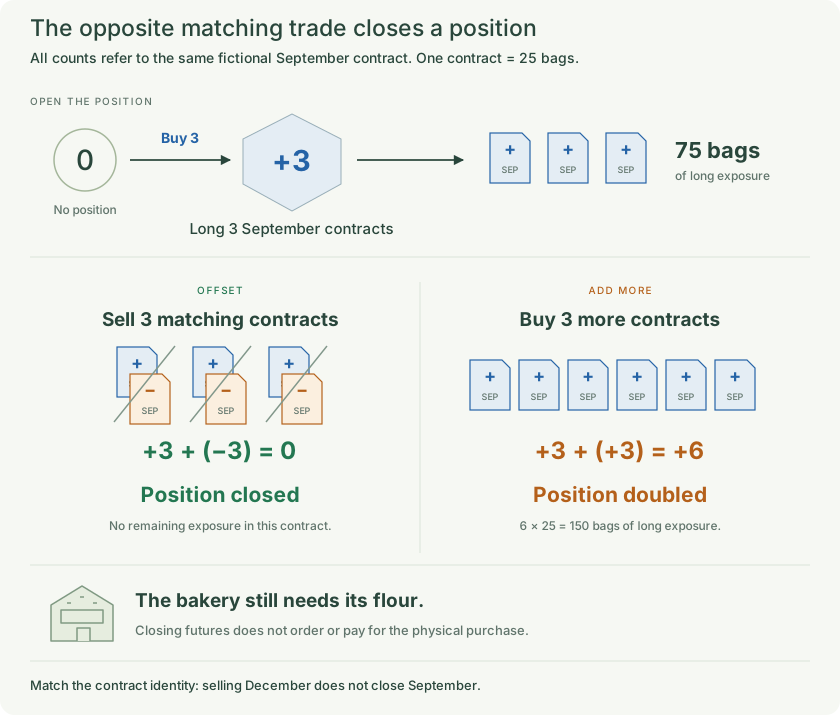
Open, increase and offset futures positions while keeping the physical business purchase separate.
Exercise 4 — Spot a doubling mistake
Suppose someone buys three more contracts instead of selling three. Calculate the new count and represented bags. This increases the position. A second trade is not automatically a closing trade; its direction and the contract identity matter.
Exercise 5 — Calculate the long’s result
Three contracts were bought at $21 per bag and closed at $24. Multiply the price change by all 75 bags. This is cumulative futures P&L; later we will see how daily settlement pays it along the way. Change the exit quote to $19.
Exercise 6 — Reverse the direction
A trader instead opened three short contracts at $21 and bought them back at $24. Reverse the subtraction order. A rising price hurts the short. Change the exit quote to $19 and see why falling prices help it.
Read the picture
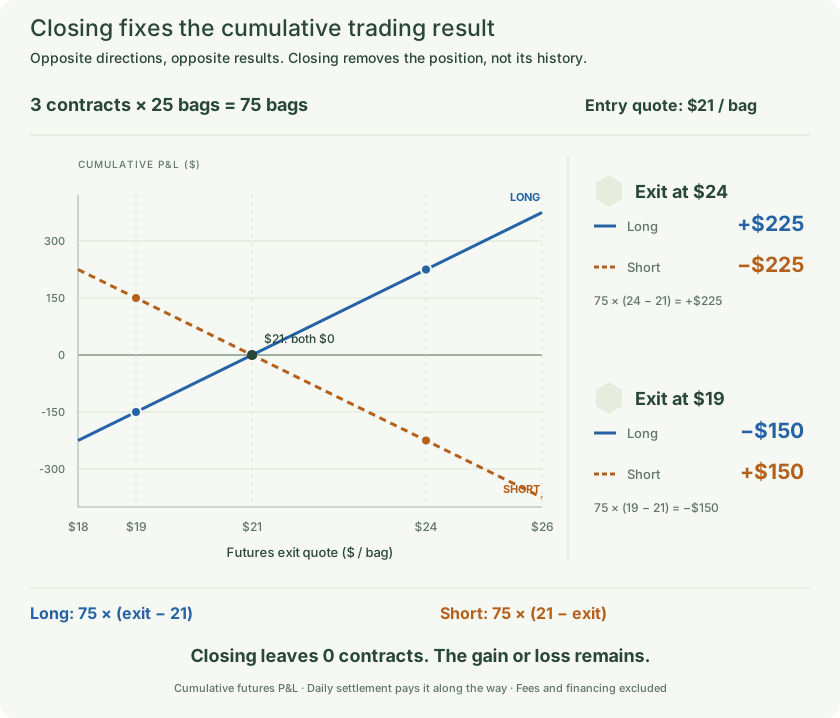
Compare the picture with the calculations above. The figure shows its stated original values; editing a cell does not change it.
Exercise 7 — Keep contracts and business needs separate
Selling three December contracts does not automatically close three September contracts. The two positions have different delivery months, even if signed bag counts sum to zero. Likewise, closing September futures does not order or pay for the bakery’s eventual physical flour purchase.
Remember
Open, increase and offset futures positions while keeping the physical business purchase separate.
These are simplified examples with matching terms unless a mismatch is explicitly introduced. Quotes and margin rules are fictional. Fees, financing and withdrawals are excluded unless stated.